Inquiry Qualification Criteria Examples That Actually Filter Inquiries
Inquiry qualification is the process of evaluating whether a prospect has the budget, authority, need, and timeline to become a paying customer before your sales team invests time in them. Getting the criteria right is the foundation of how to automate client inquiry qualification, because automation only works when you've defined exactly what a qualified prospect looks like.
Most teams define criteria too loosely. They qualify on a single signal, like a form fill or a demo request, and then wonder why their sales pipeline is full of prospects who never convert. The fix is to build criteria around the BANT framework (budget, authority, need, timeline) and then layer in fit signals specific to your business.
Here are qualification criteria examples that hold up in practice:
| Criterion | What to Check | Disqualify If |
|---|---|---|
| Budget | Stated range or company size proxy | No budget authority, no spend history |
| Authority | Decision-maker or influencer role | Junior contact with no buying power |
| Need | Specific problem your service solves | Vague interest, no defined pain point |
| Timeline | Stated start window | "Just researching" with no date |
| Fit | Industry, geography, service match | Outside your service area or niche |
A common mistake is treating any single criterion as a pass. A prospect with budget but no authority stalls; one with authority but no timeline wastes follow-up capacity. Qualified means all four basics line up, plus a fit check against your ideal customer profile.
Pro Tip Weight your criteria. Budget and authority should carry more weight than timeline, because timelines shift but buying power rarely appears out of nowhere. Build that weighting into your scoring model from day one.
AI Inquiry Qualification Software: What to Look For
AI inquiry qualification software uses machine learning and rules engines to score, filter, and route incoming inquiries without manual review, turning a raw form fill into a scored, prioritized, routed opportunity in seconds. What separates a tool that works from one that rots in your stack comes down to four things: data handling, workflow fit, error handling, and budget tier.
Data handling and enrichment. The system should append company size, industry, and buying signals automatically, but ask where that data comes from and whether you can suppress records. Enriching every inquiry with third-party personal data can create compliance exposure, so choose a vendor that documents its sources and lets you exclude records on request.
Workflow fit, not feature count. Native two-way CRM sync beats one-directional connectors, and real-time routing beats a nightly batch, an inquiry that waits eight hours for a score has already taken a meeting elsewhere. Custom scoring logic matters because your weighting of budget versus timeline differs from the next company's, and an audit trail lets you reconstruct why an inquiry was rejected six weeks ago.
The maintenance question nobody asks in the demo. A scoring model that isn't retuned drifts as your market shifts. Ask vendors three questions before you sign: Who owns scoring updates after launch? How often does the model retrain, and on what data? What happens when a rep flags an inquiry as misclassified? If the answer is "contact support," you are buying a black box. Teams that succeed run a monthly review where a sales ops owner samples misclassified inquiries and adjusts thresholds by hand.
Cost tiers: match the tool to your volume. If you are a small service business handling a few hundred inquiries a month, a full enterprise stack is overkill. A lite setup, a form-to-CRM connection, a scoring model with five or six attributes, a two-band routing rule (qualified goes to a human, everything else to nurture), and a monthly manual review of misses, can run on the CRM you already pay for plus one enrichment add-on. Enterprise teams need multi-touch attribution, custom model training, and a dedicated success manager. The mistake is buying enterprise tooling for SMB volume, or running an SMB workflow at enterprise scale.
Synergy Digital Solutions approaches this differently by combining AI inquiry qualification with smart web design and voice systems, so the qualification logic runs across your website, your phone line, and your CRM as one connected system rather than three disconnected tools.
Pro Tip Before any vendor demo, write down your monthly inquiry volume, your current qualified-inquiry rate, and the number of hours your team spends manually reviewing inquiries. Those three numbers turn a feature comparison into a cost-benefit decision.
Automated Inquiry Scoring Best Practices for 2026
Automated inquiry scoring assigns a numeric value to each prospect based on demographic, firmographic, and behavioral signals, then uses that score to prioritize follow-up. The best practice for 2026 is to score on two axes: fit and intent.
Fit scoring measures how closely an inquiry matches your ideal customer profile. Intent scoring measures how actively they're engaging. A high-fit, low-intent prospect deserves nurturing. A low-fit, high-intent prospect deserves a fast human review before you spend sales time.
Best practices that separate working models from broken ones:
- Start with fewer than ten scoring attributes. More attributes create noise before you have data to tune them.
- Separate positive and negative signals. A competitor's email domain should subtract points, not just fail to add them.
- Set a decay rule. Engagement from three months ago shouldn't count the same as engagement from this week.
- Review your false positives and false negatives monthly. Every model misclassifies some inquiries.
- Route by score band, not by exact number. Bands are easier to maintain and explain to your team.
Watch Out A scoring model that never gets retuned will quietly start rejecting good prospects. If your sales-qualified prospect rate drops for no obvious reason, check your score thresholds before you blame your marketing.
Inquiry Qualification Scripts for Chatbots That Sound Human
Inquiry qualification scripts for chatbots work best when they ask one question at a time, acknowledge the answer, and never read like a form, gathering qualification criteria without making the prospect feel interrogated.
A script structure that performs well:
- Open with value, not a question. "Happy to help you get a quote. What are you looking to solve?"
- Ask about need first. Need is the easiest criterion to discuss naturally.
- Ask about timeline second. "When are you hoping to get started?" feels conversational.
- Ask about budget last. Budget questions land better after rapport is built.
- Confirm and route. "Based on that, I'll connect you with the right person. What's the best email?"
Here is a fill-in template you can adapt:
Bot: Thanks for reaching out. What's the main thing you're trying to fix right now? Prospect: [answer] Bot: Got it. When are you hoping to have this handled by? Prospect: [answer] Bot: That helps. Do you have a budget range in mind, or should I have someone walk you through options? Prospect: [answer] Bot: Perfect. I'll pass this to [team] and they'll follow up within [timeframe]. What's the best email and phone number?
The fallback path matters more than the happy path. Build a clear handoff to a human for any answer the bot can't classify, and log every fallback so you can improve the script.
Step-by-Step: How to Automate Client Inquiry Qualification
Automating client inquiry qualification means connecting your intake channels, scoring logic, CRM, and routing rules into one workflow that qualifies prospects without manual review. Here is the sequence that works.
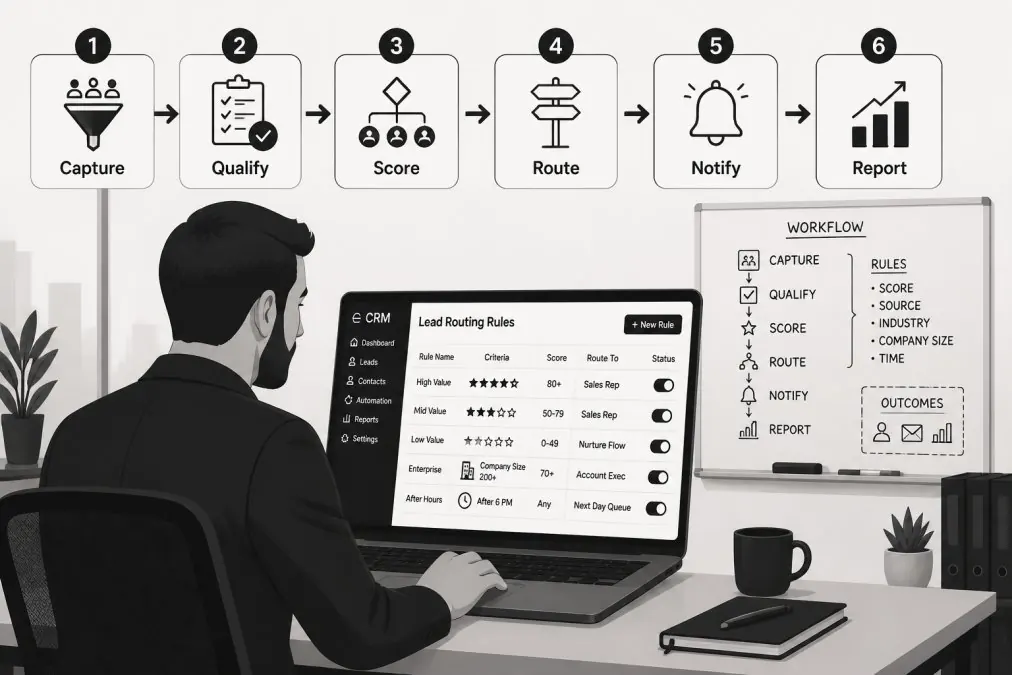
Step 1: Define your qualification criteria. Write down the exact budget, authority, need, and timeline thresholds that make an inquiry qualified. Get sales and marketing to agree on paper before you touch any software.
Step 2: Build your ideal customer profile. Document the firmographic and demographic attributes your best customers share. This becomes the fit half of your scoring model.
Step 3: Choose your data sources. Decide which fields come from form fills, CRM history, and enrichment, then map every field to a scoring input.
Step 4: Set up CRM integration. Connect intake channels to your CRM so every inquiry lands in one place with a consistent record structure.
Common Mistakes When Automating Inquiry Qualification
Key Takeaway The teams that get the most from automated qualification treat it as a system to maintain, not a project to finish. Monthly review of scoring accuracy matters more than the initial setup.
Conclusion
The hard part of automated inquiry qualification isn't the software, it's deciding what "qualified" means for your business and then holding the system to that standard month after month.
Frequently Asked Questions
What is the 5-minute rule for inquiry response time?
The 5-minute rule says you should contact a new inquiry within five minutes of their inquiry. Research consistently shows that responding within five minutes makes an inquiry far more likely to convert than waiting even an hour. Automated inquiry qualification handles this by instantly scoring and routing inquiries to the right person, so follow-up starts the moment a form is submitted or a call ends. Without automation, inquiries sit in an inbox until someone checks it.
How can AI be used for inquiry qualification?
AI evaluates prospects using data signals like firmographic data, demographic data, and intent data. It assigns a score based on how closely an inquiry matches your ideal customer profile, then routes high-scoring prospects to sales and sends lower-scoring ones into nurturing sequences. AI also powers chatbots and voice systems that ask qualifying questions in real time. The result is consistent, round-the-clock inquiry filtering that does not depend on staff availability.
What data points are essential for effective inquiry qualification?
The core data points fall into three groups: firmographic data (company size, industry, revenue), demographic data (job title, role, decision-making authority), and intent data (pages visited, content downloaded, pricing page views). Behavioral signals like email opens and demo requests also matter. Combine these with your qualification criteria examples to build a scoring model. The exact mix depends on your ideal customer profile and sales cycle length.
How does automated inquiry qualification improve conversion rates?
Automated inquiry qualification improves conversion rates by removing delays and human inconsistency. Inquiries get scored and routed in seconds, so sales reps spend time on prospects who are ready to buy instead of chasing poor fits. Automated follow-up keeps lower-scoring prospects warm through prospect nurturing. Over time, the system learns from closed deals and refines its scoring, which tightens your sales pipeline and lowers customer acquisition cost.
Results vary. Examples are illustrative, not typical or guaranteed.