
Why Customer Feedback Drives Support Workflow Redesign
Using customer feedback to improve support workflows transforms reactive support into proactive service.
Most teams collect feedback but never act on it.
We've watched businesses double their support capacity without hiring more staff by mapping customer pain points against current workflows and eliminating the bottlenecks customers identified.
The process sounds straightforward, collect feedback, find patterns, fix the workflow, but it requires discipline: distinguishing one-off complaints from systemic issues, prioritizing problems, and measuring whether changes work.
Customer Feedback Collection Methods That Actually Work
You cannot improve what you do not measure. Feedback collection is the foundation, but not all channels deliver the same insights.
Direct channels: surveys and interviews
Surveys and interviews give you intentional feedback, but they take time to complete, so response rates often disappoint.
Survey best practices:
- Keep surveys under 5 minutes (fewer questions = higher completion rates)
- Ask specific questions about your workflow, not general satisfaction
- Include open-ended questions where customers describe problems in their own words
- Send surveys immediately after support interactions when experiences are fresh
Interview approach:
- Schedule 15-30 minute calls with customers who recently used support
- Ask them to walk through their experience step by step
- Listen for moments where they hesitated, repeated themselves, or expressed frustration
- Record themes, not individual quotes, patterns matter more than single opinions
Passive channels: support tickets and chat logs
Support tickets and chat logs contain gold: customers describe problems in real time, unprompted, without softening their language.
What to extract from tickets and chats:
- Recurring questions (if you see the same issue 10 times, your knowledge base or workflow failed)
- Escalation patterns (which issues jump between team members before resolution)
- Time-to-resolution by issue type (some problems take 10 minutes; others take 3 days)
- Sentiment shifts (when customers move from calm to frustrated in the conversation)
Email, live chat, and ticketing systems generate this data automatically, but thousands of tickets per month become noise without an analysis system.
Crafting Customer Feedback Survey Questions That Reveal Workflow Gaps
Generic satisfaction questions ("How satisfied are you?") don't tell you what to fix. Ask questions that expose workflow problems.
Workflow-focused survey questions:
- "How many times did you contact us before your issue was resolved?" (reveals escalation or transfer problems)
- "Did you have to repeat information to different team members?" (flags handoff inefficiencies)
- "What step in our support process took the longest?" (identifies bottlenecks)
- "What information did we ask for that you had already provided?" (shows redundant data collection)
Avoid "Would you recommend us?" or "How professional was our team?", those measure satisfaction, not process failures.
Question structure that works:
- Start with "How" or "What" rather than "Did"
- Ask about specific steps, not overall experience
- Include an open field where customers describe problems in their own words
- Keep answer options simple (1-5 scale, yes/no, or free text)
One company discovered their average resolution time was actually 18 days, not the 3 days they thought: customers kept tickets open waiting for follow-up, but the team considered them "resolved" after sending initial guidance.
Customer Feedback Analysis: From Data to Actionable Insights
Raw feedback, hundreds of responses, thousands of ticket notes, hours of chat logs, is not actionable until analysis extracts meaning.
Identifying patterns and recurring complaints
Start by sorting feedback into categories. Look for issues that appear multiple times.
Common categories:
- Slow response time
- Unclear instructions or documentation
- Having to repeat information
- Transfers between team members
Count how many customers mention each problem: 15 saying "I had to contact you twice" is a pattern; one is an outlier. Patterns reveal systemic workflow problems.
How to spot patterns in unstructured feedback:
- Read 50-100 responses and note recurring themes
- Sort by issue type, then count frequency
- Look for language that repeats ("had to wait," "kept getting transferred," "told me to call")
- Flag emotional language (frustration, anger) as higher-priority issues
Whether you use text analysis tools or assign team members to categorize, look for the 3-5 problems mentioned most often.
Prioritizing issues by impact and frequency
Not all problems are equally important: an issue affecting 2% of customers but taking 8 hours to resolve differs from one affecting 20% but taking 5 minutes.
Prioritization framework:
| Issue | Frequency | Resolution Time | Priority |
|---|---|---|---|
| Slow response time | 40% of feedback | 2 hours per ticket | High |
| Unclear documentation | 25% of feedback | 30 minutes per ticket | Medium |
| Repeated transfers | 10% of feedback | 4 hours per ticket | High |
| Missing product info | 5% of feedback | 15 minutes per ticket | Low |
Multiply frequency by impact: a problem affecting 40% of customers is worth fixing even at 2 hours per resolution, while one affecting 5% must be severe to justify redesign effort.
Ask these questions for each issue:
- How often does it occur?
- How long does it take to resolve?
- Does it cause escalation or repeat contacts?
- How many team members does it involve?
Redesigning Your Support Workflow Based on Feedback Insights
Feedback analysis reveals problems; redesign fixes them. Map your current workflow, identify where feedback points to breakdowns, and rebuild those sections.
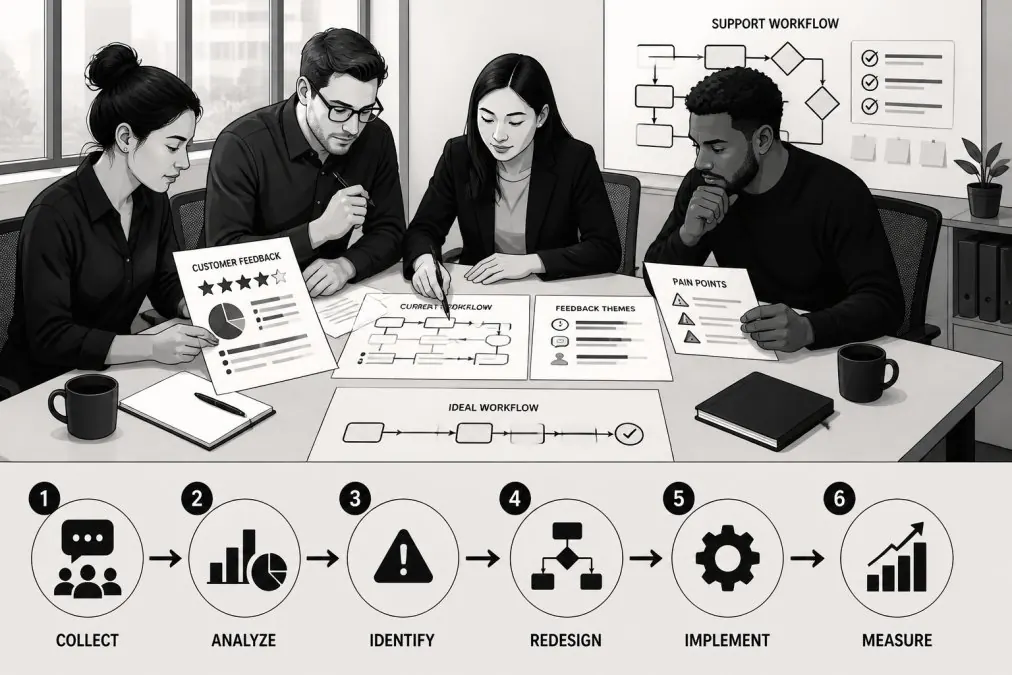
Step 1: Map current state vs. customer pain points
Draw your workflow as it actually exists, not the process you think you follow.
Current state map should show:
- Every step a ticket moves through
- Who handles each step
- How long each step typically takes
- Where handoffs happen (customer to team, team member to team member)
Then overlay customer feedback: mark steps where customers reported slowness, handoffs where they repeated information, and decision points where they got transferred.
The gaps between your intended workflow and customer experience become obvious.
Example: Your workflow says "Customer emails support → Support agent responds within 2 hours → Issue resolved." But feedback reveals customers often wait 24 hours for first response, then get transferred twice before resolution.
Step 2: Define ownership and service-level expectations
Ambiguity kills workflows: when multiple people can handle a task, none do; when no one owns an escalation, it sits in limbo.
Redesigned workflows need clear ownership: one person or team owns each step, knows what they are responsible for, the deadline, and what happens if they miss it.
Define for each workflow step:
- Who owns it (one person or team, not "whoever is available")
- What the input is (what information they receive)
- What the output is (what they deliver to the next step)
- The deadline (how long this step should take)
- The escalation trigger (when does this move to the next person)
Service-level expectations sound like: "First response within 4 hours. Initial diagnosis within 24 hours.
Step 3: Implement changes and test with real tickets
Do not redesign your entire workflow at once. Test changes with real tickets first.
Pick the highest-priority problem from your feedback analysis. Redesign that workflow section. Run it for one week with 50-100 tickets.
Test metrics:
- Response time (did it get faster?)
- First-contact resolution (did more issues resolve without escalation?)
- Customer satisfaction on that specific issue (did the redesign address the complaint?)
- Team efficiency (did the change reduce or increase workload?)
If the redesign improves the metric, roll it out. If not, adjust and test again. If it makes things worse, revert and try a different approach.
Customer Support Workflow Automation to Scale Feedback-Driven Improvements
Once you've redesigned workflows based on feedback, automation scales them. Manual processes work at small volumes but break down at scale.
Routing and triage automation
Feedback often reveals that customers get routed to the wrong team or wait too long in queue. Automation fixes both.
Routing automation:
- Read the customer's issue (from email subject, chat message, or form field)
- Match it to the right team based on keywords or category
- Assign it immediately instead of waiting for manual review
- Escalate to senior staff only when needed, not by default
Triage automation:
- Identify high-priority issues (customers mentioning urgent language, recurring problems, high-value accounts)
- Surface these first in your team's queue
- Flag issues that match patterns from your feedback analysis
- Separate routine questions from complex problems
Automation doesn't replace human judgment, it handles routine categorization so your team focuses on problem-solving.
AI-powered responses and escalation rules
Some customer issues repeat so often you can automate the response entirely; others should escalate immediately.
Self-service automation:
- Identify the 10-20 most common questions from your feedback analysis
- Create automated responses that answer these questions
- Offer customers the option to escalate if the automated answer does not help
- Measure how many customers accept the automated response versus escalating
Smart escalation:
- Route complex issues to specialists immediately instead of starting with a generalist
- Flag issues that require manager approval before response
- Escalate if a customer has contacted support more than twice on the same issue
- Route to the person who handled the customer's previous issue (continuity reduces repeat explanations)
Businesses can implement these automations through AI-driven support systems. These systems learn from feedback patterns and route tickets intelligently, reducing manual work while improving first-contact resolution.
Measuring Success: Feedback-Specific Support Metrics
You changed your workflows based on customer feedback. Now measure whether those changes worked.
Response time and first-contact resolution
These are the metrics customers complain about most.
Response time: How long between customer contact and first team response. If feedback said "I waited 3 days," target under 4 hours and measure weekly.
First-contact resolution: What percentage of issues are fully resolved on first contact without escalation, transfer, or follow-up.
Track both metrics before and after your workflow redesign. A 20% improvement in either metric justifies the effort.
Customer satisfaction and sentiment trends
Surveys and feedback show whether customers feel the improvement.
Satisfaction score: Ask the same satisfaction question before and after redesign.
Sentiment in feedback: Read new feedback after your redesign. If complaints about response time drop from 40% of feedback to 15%, your redesign worked.
Compare feedback from before and after redesign. The goal is not perfection but measurable improvement in the specific areas customers complained about.
Common Pitfalls When Acting on Customer Feedback
Acting on feedback is harder than collecting it. Teams stumble in predictable ways.
Treating all feedback equally: One customer complains about something that no one else mentions.
Redesigning without testing: You read feedback, redesign your entire workflow, implement it across all tickets.
Never closing the loop with customers: You made changes based on their feedback. Tell them.
Frequently Asked Questions
Why is customer feedback important for improving support workflows?
Customer feedback reveals exactly where your support workflows break down. When customers report long wait times, unclear responses, or repeated issues, they're telling you which steps slow down resolution. Feedback also identifies gaps between what your team thinks works and what customers actually experience. By acting on this data, you reduce resolution time, lower support costs, and increase customer satisfaction scores. Most importantly, feedback-driven changes are based on real customer behavior, not assumptions.
What are the best customer feedback collection methods for support teams?
Combine multiple channels: post-interaction surveys (CSAT), support ticket analysis, and periodic interviews with high-volume customers. Surveys should be brief and appear immediately after ticket closure. Ticket data itself is feedback, analyze tags, reopened cases, and escalations for patterns. For deeper insight, conduct quarterly interviews with 5-10 customers to understand frustrations surveys might miss. Real-time chat feedback and NPS surveys also reveal sentiment. The goal is capturing feedback at the moment of frustration, before customers forget details.
How do you measure whether support workflow changes actually work?
Track metrics before and after changes: average response time, first-contact resolution rate, customer satisfaction score (CSAT), and ticket reopening rate. Compare sentiment in feedback before and after implementation. If you reduced response time by automating triage, measure whether customers report faster replies. If you added a knowledge base based on recurring questions, track how many tickets reference self-service articles. Set a baseline, implement one workflow change at a time, and measure impact over 2-4 weeks. This prevents guessing about what actually improved customer experience.
What should we do if customer feedback contradicts what our support team prefers?
Prioritize customer feedback when it reveals friction in the support experience. If customers complain about slow email responses but your team prefers email, consider adding live chat or AI-powered first responses. However, validate the feedback: is it from a small, vocal group or a clear majority? High-volume, recurring complaints signal real workflow problems. Involve your support team in the redesign process, they often have ideas for solving customer issues that align with both customer needs and operational reality. Resistance usually drops when the team sees how changes reduce their workload.
Results vary. Examples are illustrative, not typical or guaranteed.